ArcadeWhale
A good parking game is a strange thing to enjoy. Nothing explodes, nobody is chasing you, and the whole challenge is getting a car into a box. But when the car actually steers like a car, backing into a tight bay turns into a small puzzle with a very satisfying end: the lines light up, the stars come in, and you did it without touching anything.
These three all play in your browser, on a phone or a computer, for free. Two are proper parking games with levels and stars. The third is an open city where parking is something you do between everything else. All three steer the way a real car does, which is the thing that separates a parking game from a car on rails.
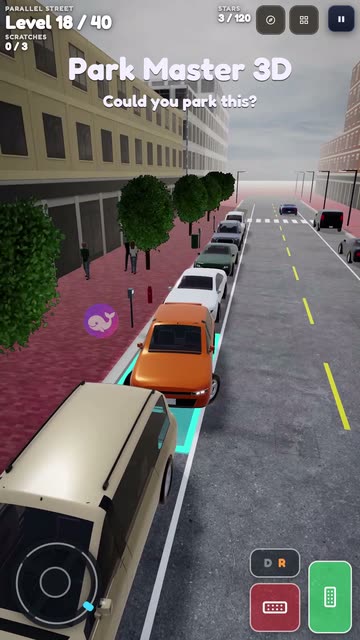
Here is Park Master 3D in a short clip from our channel:
1. Park Master 3D: a steering wheel and 40 levels
This is the one to start with if you want a full 3D parking game. You turn a steering wheel on the screen, press a green pedal to drive and a red one to brake, and flip a D/R switch to reverse. The job is always the same, stop inside the glowing bay, but the places change a lot over 40 levels: an open lot, reverse bays, a two-way street where you parallel park at the kerb while traffic waits behind you, an underground garage full of columns, a long box van, and finally night and rain.
The clip above is level 15, a parallel park on the street. Each level gives up to three stars: one for parking, one for not touching anything and one for ending up straight and centred in the lines. Three cameras help a lot here. The chase view is the most natural, the driver’s seat has working mirrors, and the top view shows the whole lot when you can’t tell where your back corner is. After level 20 a valet mode opens at a hotel, where guests’ tips shrink the longer they wait for their car.
Touch: wheel and pedals. Keyboard: W drive, S reverse, Space brake, A/D steer, C changes the camera.
2. Tight Spot: a top-down puzzle of tight lots
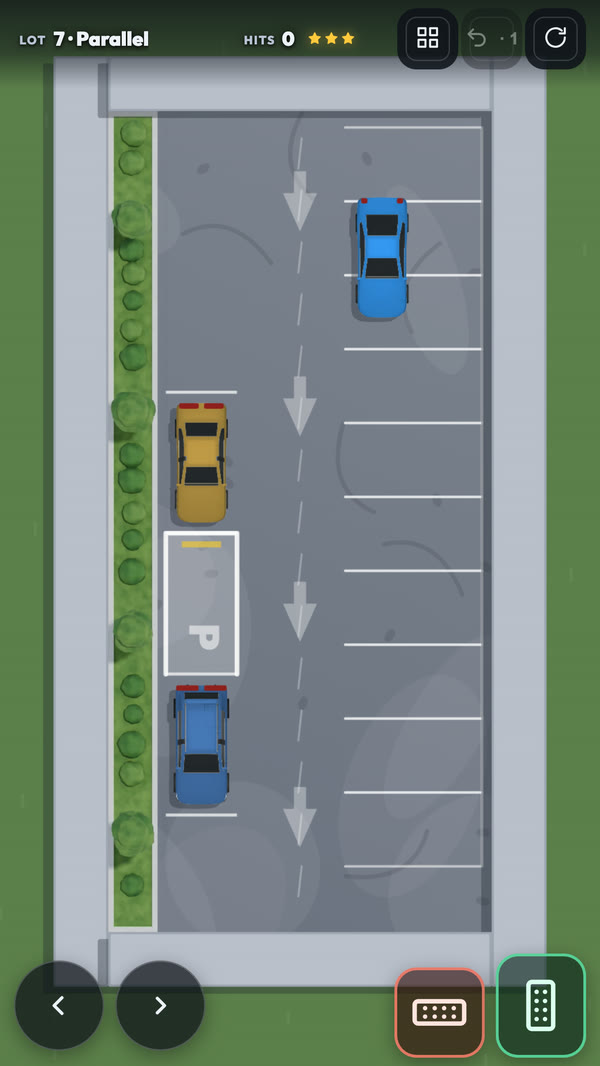
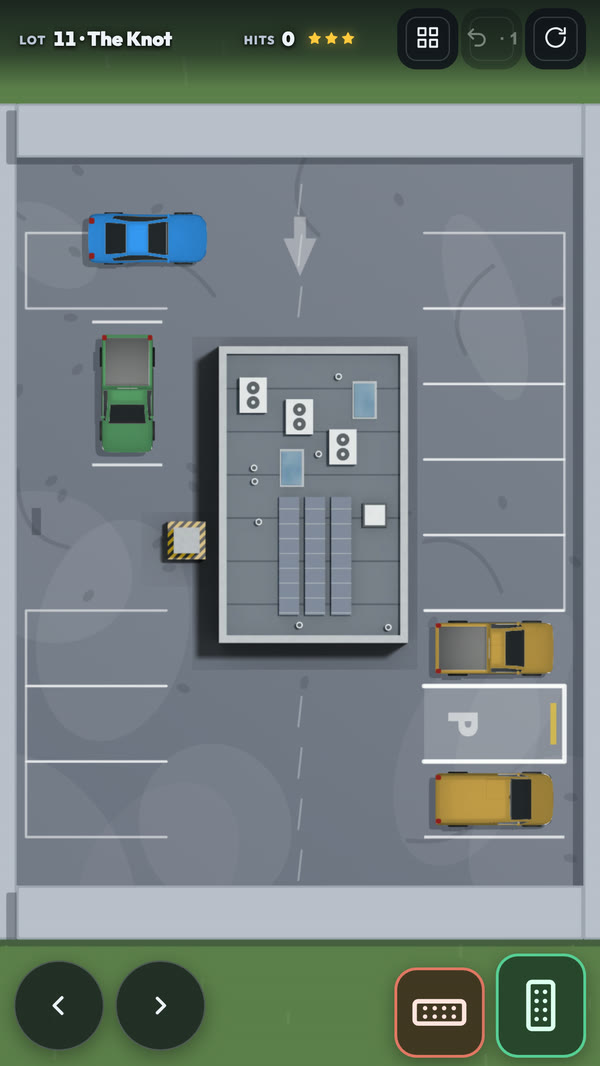
Tight Spot looks down on the lot from above, which turns parking into geometry. There are eleven lots in three yards, one car and no timer. The car only goes at walking pace, so speed never matters. What matters is the angle you come in at and how many times you have to shuffle back and forth.
Hitting something doesn’t end the level. The car scrapes, slows down and carries on, but each hit costs a star. Park without touching anything for three stars, one hit leaves two, more leaves one. On the left above is lot 7, Parallel: the gap is 5.8 metres and the car is 4.4, so you can’t get in nose first and have to reverse in like on a real street. On the right is the last lot, The Knot, which takes six changes of direction to solve. A parking sensor beeps faster as you get close to something, the same way it does in a real car.
Touch: two pads to steer, two for drive and reverse. Keyboard: W/S drive and reverse, A/D steer, R restart.
3. City Drive: park anywhere in an open city
City Drive is not a parking game in the strict sense. There is no glowing bay and no stars for parking. It’s an open city with traffic, traffic lights, stunt ramps and a harbour, and the blocks in the middle of the grid are parking lots with painted bays, concrete barriers and rows of parked cars. You can pull into any of them and practise lining the car up between the stripes.
We include it because it’s the best place here to practise the thing parking games leave out: getting to the spot. The cars have weight, the nose dips when you brake hard, and a pickup or van needs a lot more room to stop than the coupe does. If the two games above feel too much like a puzzle, this is the relaxed version.
Touch: steering pads and pedals. Keyboard: W/A/S/D drive, Space handbrake, E get in or out of a car.
How to park in any parking game
The three games work differently, but they all use the same basic car physics, and so do most good parking games. These habits carry over:
- The car turns around its back wheels. That’s why the front swings out wide when you reverse and why a bay you can’t reach going forwards often opens up the moment you back into it. If you keep hitting the car next to you with your front corner, try reversing in.
- Slow is free. None of the parking levels above has a clock. Going back and forth a few times costs nothing, while touching something costs a star.
- For a parallel park, pull up alongside first. Stop next to the car in front of the gap, reverse while turning towards the kerb, then straighten out as the back of your car slips into the space. In Tight Spot the gap is only 1.4 metres longer than the car, so there is no room to fix a bad angle halfway in; start again instead.
- “Parked” means stopped and straight. Both games want the car fully stopped, inside the lines and square to the bay. In Tight Spot that means all four corners in and less than eight degrees off.
- Use the top view when you are unsure. In Park Master 3D, press C until you see the lot from above. It shows exactly how much room is left behind you.
All three are with the other driving games on the site, and they save your progress on your own device, so you can stop after one level and pick up later.