ArcadeWhale
The trouble with phone games is rarely the game. It’s the store page, the 400 MB download, the account, the permissions screen and the tutorial, all standing between you and the five minutes you actually have. A game that runs in the browser skips every one of those steps. You tap a link and you are playing.
The other thing that matters on a phone is how long you have. A game that is perfect for a bus ride is miserable in a checkout queue, and a game made for the queue gets boring over a long evening. So instead of ranking these five, we sorted them by the kind of wait they fit.
All the clips below were recorded at phone size, in portrait, so they show what you’ll see on your own screen.
In a queue, one minute: Neon Snake
Snake is the original phone game, and it still works best when you have almost no time. This version has no menu at all. The board is already there when the page opens and your first swipe sends the snake off. Eat the pink pellets, grow, and don’t hit the wall or your own tail.
Two small things keep it from being the same run every time. After six points a gold pellet shows up now and then, worth three, with a ring around it that drains away, so you have to decide if it’s worth the detour. After twelve points glowing pillars start appearing, one more every six points, and the open arena slowly turns into a maze. A bad turn ends a run in seconds, which is exactly what you want when the queue moves.
Controls: swipe anywhere to turn.
On the bus, five minutes: Gatefire
A squad of soldiers runs across a long red bridge and fires straight ahead on its own. You only move it left and right with your thumb. Because every bullet goes straight, where you stand is what you shoot, and that single rule is the whole game.
Blue gates on the road carry a number, and shooting a gate makes the number go up, so a +3 you keep firing at can turn into a +11 before you walk through it. Some gates multiply the squad, a red one halves it, and a gold one makes everyone shoot faster. Stacks of tires hold prizes like a better gun or a tank, and then the zombies arrive. You’re always choosing between growing the gate, breaking the stack and facing the horde. There are 30 stages with a big boss every few, so it lasts for more than one commute.
Controls: swipe left and right.
Lunch break, fifteen minutes: Pastry Pile
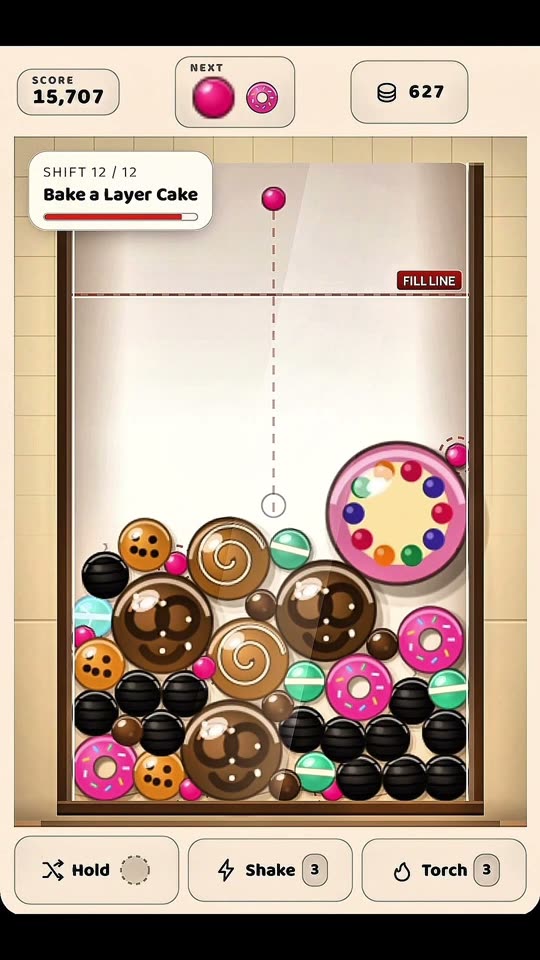
A merge game on a bakery counter. Pastries drop into a glass tray, and when two of the same kind touch they fuse into the next treat. Sprinkles become cocoa beads, beads become macarons, and eleven steps later you have a Grand Gateau. The pastries roll and settle with real physics, so where one lands matters as much as where you aimed it.
What makes it more than a merge toy is the order. Each of the twelve shifts asks for one specific pastry and gives you a fixed number of drops to make it, so you’re planning the pile instead of just tapping. Later shifts add bouncy marshmallows, sticky caramel and a timed Closing Rush where drops come twice as fast. Coins from every shift buy upgrades that stay, so even a bad run moves you forward.
One chain from the last shift, from our YouTube channel:
Controls: slide your finger to aim, tap to drop.
A long evening, thirty minutes and more: Railroot
The one to open when you’re on the couch with nowhere to be. You draw tram lines between the stops of a small toy town and keep riders moving. Every rider has a shape, circle, triangle, square, and wants to reach a stop with that shape. If a stop stays crowded too long, the run ends.
The clever part is how the town grows. Each week a new district appears right beside the line that carried the most people, so your best route becomes the busiest one and then the first to jam. A zoning stamp lets you send the growth somewhere else. Rivers need bridges, hills force detours, and each week you pick one of three cards: another tram, a bigger carriage, a bridge, a new line color. A full run is a proper half hour and still hands you something new near the end.
Controls: drag from the end of a line to a stop, tap to add trams. Easier with two hands or the phone on a table.
When you don’t want to think: Whale Bay
Sometimes being bored means you want something to do with your thumb while half watching TV. Whale Bay is that game. You run a small seaside aquarium: stand at the pier and fish jump into the basket on your back, walk to a tank and they pour in, and guests start paying to look. Their cash lands on the ground as little stacks you walk over to collect.
The money goes into new tanks, a feed mixer and three staff who take the chores off your hands. Seven tanks lead from sardines and clownfish through jellyfish, sharks and turtles to a whale lagoon. Once you hire a cashier the park keeps earning for up to two hours while you’re away, so it’s a good one to check on between other things.
Controls: drag anywhere to walk.
Make them feel like apps
If one of these sticks, put it on your home screen. On an iPhone, open the page in Safari, tap Share and then Add to Home Screen. On Android, open the Chrome menu and tap Add to Home screen or Install app. You get an icon next to your other apps and it opens without the browser bars. On Android your progress carries over from Chrome. On an iPhone the home screen version keeps its own save, separate from Safari, so move your progress over with Transfer your progress or just keep playing from the icon.
For more that work well on a small screen, try Browser Games to Play When Bored, where two of the five are played with a single finger, or look through all the free games.